Email sending API
Send email from your own domain, on our mail servers.
Add your domain's DNS records, then send by API. We run the mail servers, handle bounces and spam complaints, and keep sending within limits that protect your domain's reputation.
- Status
- Early access
- Set up
- The DKIM records, an ownership TXT and ideally DMARC
- Handled for you
- Bounces and spam complaints
- Limits
- Daily, rising as your mail is received well
- Planned price
- £0.15$0.25 per 1,000 emails
How it works
Your name on it, our servers behind it.
Each domain gets its own signing key, so nobody else can send as you. A new sender starts low and goes up as its email is received well. These are the limits and scores MagpieCRM on Magpie Cloud uses today.
Your DNS
- The DKIM records
- An ownership TXT record
- A DMARC record, ideally
Our mail servers
Sign each email with your domain's own key, once the domain shows as ready.
The recipient's mail server
Checks the signature against your DNS, so the email counts as sent by your domain.
Bounces and spam complaints are recorded, and those addresses are never emailed again.
Cold email, a day
Opt-in email, a day
| Week | Cold, a day | Opt-in, a day |
|---|---|---|
| 1 | 30 | 200 |
| 2 | 60 | 500 |
| 3 | 100 | 1,000 |
| 4 | 150 | 2,500 |
| 5 | 200 | 5,000 |
| 6 onwards | 300 | No daily limit: your plan's allowance |
A week needs at least 30 emails sent to be judged. At risk, the limit stays where it is; Poor, it steps down.
- PoorUnder 50%
- At risk50% to 79%
- Good80% and over
- Hard bouncesat risk from 2%poor from 5%
- Spam complaintsat risk from 0.1%poor from 0.3%
- Unsubscribesat risk from 2%
- Opensat risk under 10%
Opens count people, not security scanners, and only for email sent with open tracking on. The score is judged from how your email is received, not by reading it.
Preview
What a call to the email sending API looks like.
This is how the API is planned to work. Names and fields may change before launch.
curl https://api.magpie-cloud.com/v1/emails \
  -H "Authorization: Bearer $MAGPIE_API_KEY" \
  -H "Content-Type: application/json" \
  -d '{
    "from": "Jordan <jordan@yourcompany.example>",
    "to": "alex.sample@examplefreight.example",
    "subject": "Quick question about your depots",
    "text": "Hi Alex, ..."
  }'
const res = await fetch("https://api.magpie-cloud.com/v1/emails", {
method: "POST",
headers: {
Authorization: `Bearer ${process.env.MAGPIE_API_KEY}`,
"Content-Type": "application/json",
},
body: JSON.stringify({
from: "Jordan <jordan@yourcompany.example>",
to: "alex.sample@examplefreight.example",
subject: "Quick question about your depots",
text: "Hi Alex, ...",
}),
});
const data = await res.json();import os
import requests
res = requests.post(
"https://api.magpie-cloud.com/v1/emails",
json={
"from": "Jordan <jordan@yourcompany.example>",
"to": "alex.sample@examplefreight.example",
"subject": "Quick question about your depots",
"text": "Hi Alex, ...",
},
headers={"Authorization": f"Bearer {os.environ['MAGPIE_API_KEY']}"},
timeout=90,
)
data = res.json(){
"id": "msg_4b9e...",
"status": "queued"
}In MagpieCRM today
Sent, delivered, and kept clean.
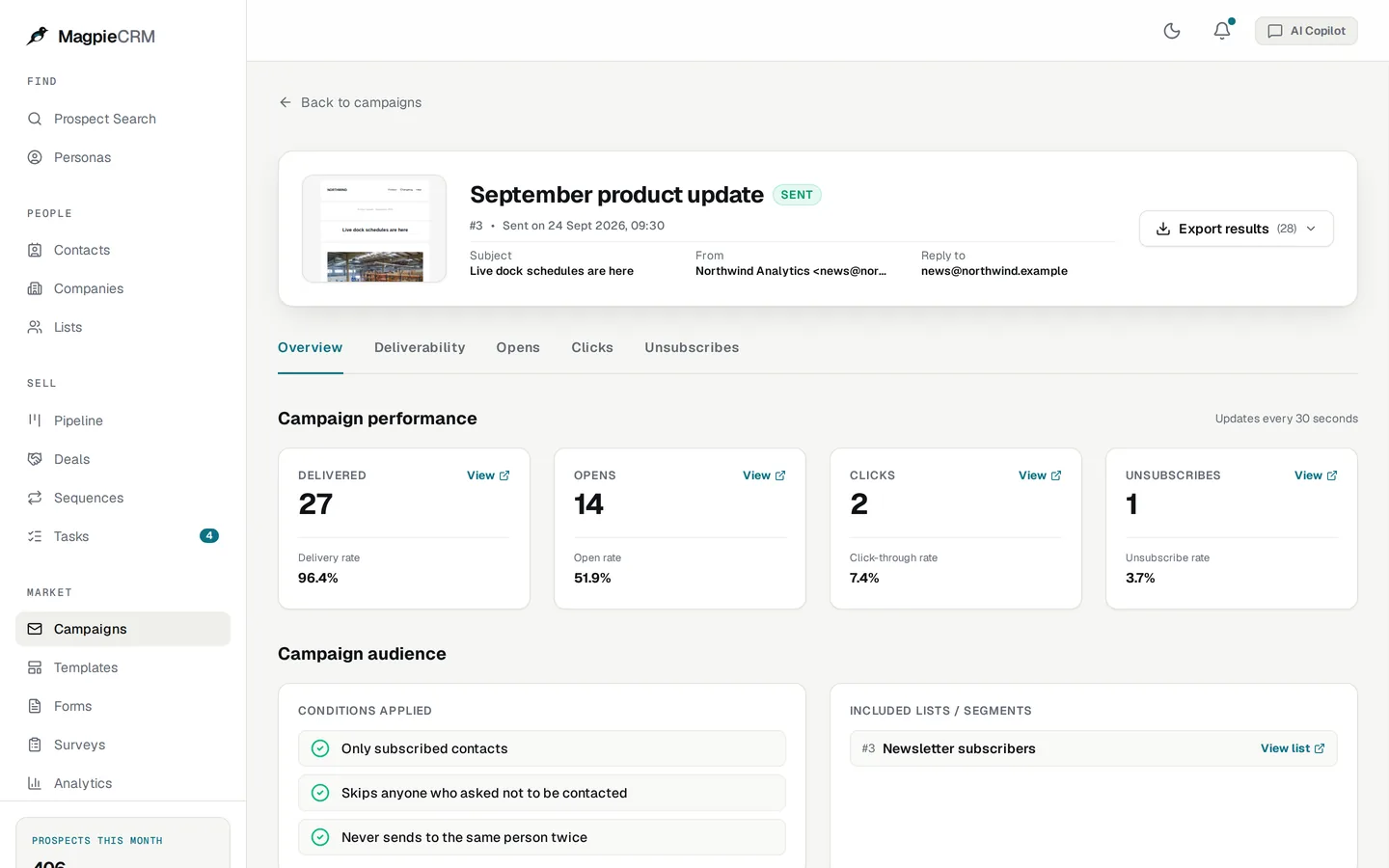
MagpieCRM's campaigns go out on the same mail servers. Bounces and complaints are recorded, and those addresses are never emailed again.
- An address that hard-bounces isn't sent to again
- Nor is one that marks your email as spam
- Guesses the mail server couldn't confirm go out in a small first batch
Early access
Get a key when it's ready.
The APIs aren't live yet. Tell us what you need, and we'll write when keys are ready.
Not yet
What it doesn't do yet.
The APIs are in early access. So you know before you sign up:
- It isn't live yet: early-access members get keys first.
- Delivery and open events by webhook are planned but not built.
- The planned price may change before launch.
FAQ
Questions, answered.
What do I need to set up?
A few DNS records, which we give you: the DKIM records that sign your email, a TXT record that shows you own the domain and, ideally, a DMARC record. If your domain already has DMARC, keep yours.
Why are there sending limits?
Gmail and Outlook judge a sender by how people react to its email, and a new sender that sends a lot at once looks like a spammer. Starting low and rising as your email is received well keeps it out of the spam folder.
What will it cost?
The planned price is £0.15 for every 1,000 emails, as on MagpieCRM's hosted plan. It may change before launch.The planned price is $0.25 for every 1,000 emails, as on MagpieCRM's hosted plan. It may change before launch.
Keep exploring
Related

Build on the engine behind MagpieCRM.
The APIs are in early access. Tell us what you'd use them for, and we'll write when your key is ready.