Email finder API
Find someone's work email from their name and company.
Send a first name, a last name and a company domain. The API works out the likely addresses, checks each with the company's mail server, and returns the one it confirms.
- Status
- Early access
- You send
- First name, last name, company domain
- You get
- A status:
verifiedwith the email, orcatch_all,riskyornot_foundwithout one - Catch-all domains
- Said so, not guessed
- Planned price
- 1 credit (£0.004$0.006) per email found; nothing when none is
How it works
Only addresses the mail server confirms.
It tries the formats companies use, the company's learned format first, and checks up to 6 with the mail server. It stops at the first one confirmed. No email is sent.
northwind.example, a company with no learned format yet. Each guess is checked with the company's mail server, and the search stops at the first one it confirms.- Find the company's mail server
- Test it for catch-all, once per company
- Check guesses in order, the learned format first
- first.lastGuess
jane.smith@northwind.exampleMail server550rejected - flastGuess
jsmith@northwind.exampleMail server550rejected - firstGuess
jane@northwind.exampleMail server250confirmed, stops here - firstlastGuess
janesmith@northwind.exampleMail servernot needed - first_lastGuess
jane_smith@northwind.exampleMail servernot needed - f.lastGuess
j.smith@northwind.exampleMail servernot needed
- Up to 6 checks per person. The usual formats come first; rarer shapes follow for other spellings of a name.
- Only the format is stored. Northwind learns
{first}@northwind.example, never Jane's name, and the next person there is checked against it first. - Hosted copies share company data only. On Magpie Cloud, format counts (for companies of 10 or more people, backed by 3 addresses from 2 workspaces) and catch-all verdicts are shared, so one workspace's checks save the next one's.
Read the code:emailFinder.ts,patterns.ts,sharedFormats.ts,sharedCatchAll.ts
Preview
What a call to the email finder API looks like.
This is how the API is planned to work. Names and fields may change before launch.
curl https://api.magpie-cloud.com/v1/find \
  -H "Authorization: Bearer $MAGPIE_API_KEY" \
  -H "Content-Type: application/json" \
  -d '{
    "first_name": "Alex",
    "last_name": "Sample",
    "domain": "examplefreight.example"
  }'
const res = await fetch("https://api.magpie-cloud.com/v1/find", {
method: "POST",
headers: {
Authorization: `Bearer ${process.env.MAGPIE_API_KEY}`,
"Content-Type": "application/json",
},
body: JSON.stringify({
first_name: "Alex",
last_name: "Sample",
domain: "examplefreight.example",
}),
});
const data = await res.json();import os
import requests
res = requests.post(
"https://api.magpie-cloud.com/v1/find",
json={
"first_name": "Alex",
"last_name": "Sample",
"domain": "examplefreight.example",
},
headers={"Authorization": f"Bearer {os.environ['MAGPIE_API_KEY']}"},
timeout=90,
)
data = res.json(){
"email": "alex.sample@examplefreight.example",
"status": "verified",
"pattern": "first.last"
}In MagpieCRM today
Save people, and their emails are found.
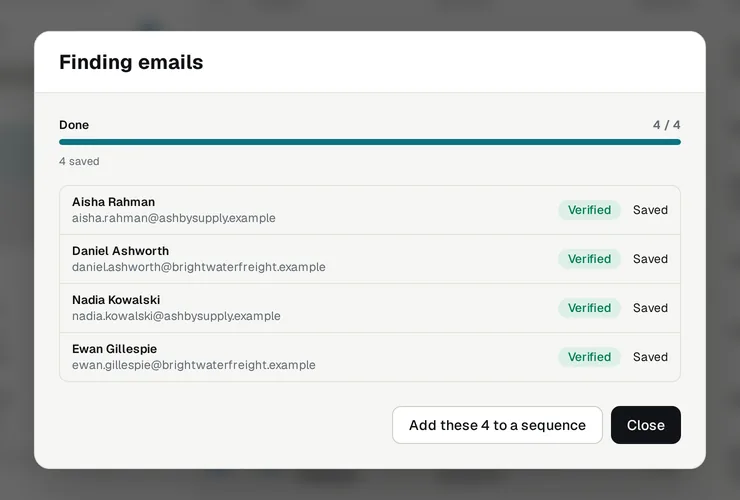
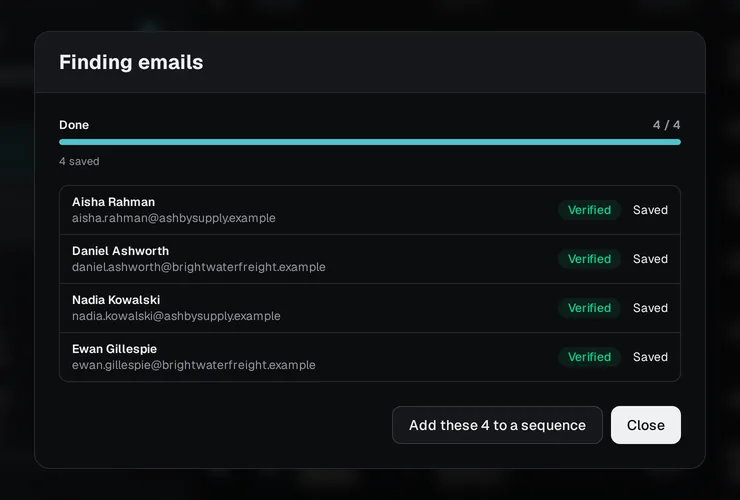
In MagpieCRM on Magpie Cloud, tick the people you want in Prospect Search and save them to a list. Each work email is found and checked with the company's mail server as they're saved.
- Only confirmed emails are saved as verified
- Catch-all and not-found results are flagged, not saved
- Once a company's format is known, the next person there takes fewer checks
Early access
Get a key when it's ready.
The APIs aren't live yet. Tell us what you need, and we'll write when keys are ready.
Not yet
What it doesn't do yet.
The APIs are in early access. So you know before you sign up:
- It isn't live yet: early-access members get keys first.
- Finding emails for a whole list in one call is planned but not built.
- The planned price may change before launch.
FAQ
Questions, answered.
How does the email finder work?
It tries the formats companies commonly use for work emails, and checks each with the company's mail server until one is confirmed. It returns only a confirmed address.
What if no email is found?
You get an answer saying none was found, and the planned price for that call is nothing.
What does the status mean?
verified: the company's mail server confirmed the address, and it comes back with the answer. catch_all: the domain accepts every address, so nothing can be confirmed there. risky: the mail server only gave a risky answer, so nothing was confirmed. not_found: every likely address was rejected, or the domain takes no email. Only verified comes with an email, and only a verified find is planned to be charged.
What will it cost?
The planned price is 1 credit (£0.004) for each email found. It may change before launch.The planned price is 1 credit ($0.006) for each email found. It may change before launch.
Keep exploring
Related

Build on the engine behind MagpieCRM.
The APIs are in early access. Tell us what you'd use them for, and we'll write when your key is ready.